πŸ†XenFootprint

Indicator πŸ†XenFootprint

  • Thread starter Thread starter Mark
  • Start date Start date
  • Featured
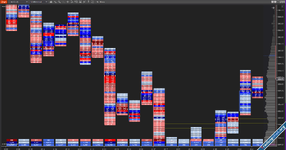
1771337146479.png


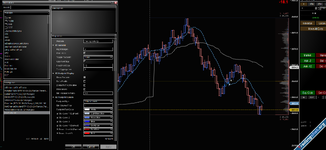
πŸ”₯ XenFootprint – The 4-Level Visual Footprint System​


Most footprint indicators show numbers.
Some add basic coloring.


XenFootprint is engineered around visual decision speed. ⚑
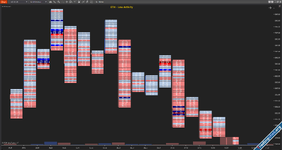
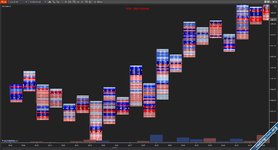
Its core advantage is a structured 4-Level Color Engine that transforms raw bid Γ— ask data into instantly readable intensity zones β€” so traders can identify aggression, dominance, and imbalance strength without overanalyzing numbers.


eth.PNG
rth.PNG

🧠 Designed for Visual Order Flow Traders​


In fast markets, traders don’t have time to compare ratios manually.

XenFootprint automatically normalizes volume and delta data into four clear intensity levels:

🟦 Level 1 – Light participation
🟦 Level 2 – Moderate activity
🟦 Level 3 – Strong participation
🟦 Level 4 – Extreme aggression

This applies dynamically across visible bars, allowing the chart to adapt to current market conditions instead of relying on static thresholds.

The result:

βœ” Faster decision making
βœ” Clearer dominance recognition
βœ” Reduced cognitive load
βœ” Immediate identification of aggressive participation


🎨 Volume Levels & Imbalance Levels​

Two modes. Two different reads of the market.

πŸ“Š Volume Levels​


Shows where participation was strongest inside the bar.

Use it when you want to spot:

πŸ“ High-activity price zones
πŸ“ Absorption areas
πŸ“ Strong auction development
πŸ“ Liquidity acceptance

Best for:
βœ” Structure traders
βœ” Auction market traders
βœ” Scalpers watching intrabar volume

You instantly see where the market was active.


⚑ Imbalance Levels​


Highlights aggressive dominance between buyers and sellers.

Use it when you want to spot:

πŸ”₯ Initiative buying
πŸ”» Aggressive selling
βš” Control shifts
πŸš€ Momentum building

Best for:
βœ” Breakout traders
βœ” Momentum scalpers
βœ” Stacked imbalance traders

You instantly see who’s pressing the market.


⚑ One-Click Activation

β”Œβ”€β”€β”€β”€β”€β”€β”€β”€β”€β”€β”€β”€β”€β”€β”€β”€β”€β”€β”€β”€β”€β”€β”€β”€β”€β”€β”€β”€β”€β”€β”€β”
β”‚ SHOW FOOTPRINT β”‚ HIDE FOOTPRINT β”‚
β”‚ [Shift+Space] β”‚ [Shift+Space] β”‚
β””β”€β”€β”€β”€β”€β”€β”€β”€β”€β”€β”€β”€β”€β”€β”€β”€β”€β”€β”€β”€β”€β”€β”€β”€β”€β”€β”€β”€β”€β”€β”€β”˜

Toggle footprint view instantly with customizable hotkeys. Switch between regular charts and footprint view without losing your settings.​


🎯 Min Volume Filter – Cleaner, Smarter Footprint​


Not every printed trade matters.

The Min Volume Filter removes low-volume noise by applying a minimum threshold to each price level.

πŸ”Ž How It Works​

If volume at a price level is below your defined threshold:

➑ It is automatically displayed as Level 1 colour (lowest intensity)
➑ It does not get highlighted as significant activity
➑ It reduces visual clutter inside the bar

Only meaningful participation stands out.

πŸ“¦ Other Key Features​

πŸ”Ή Tick Aggregation Control – Group price levels for cleaner structure and reduced noise.​
πŸ”Ή Integrated Session Volume Profile – Real-time POC, VAH, VAL with automatic value area calculation.​
πŸ”Ή Auto Chart Scaling Adjustment – Optimized bar width and spacing when footprint is enabled.​
πŸ”Ή Per-Bar Summary Statistics – Total volume, bar delta, cumulative delta tracking.​
πŸ”Ή Delta Profile Mode – Visual delta intensity inside each bar.​
πŸ”Ή Stacked Imbalance Detection – Identifies consecutive aggressive dominance zones.​
πŸ”Ή Cumulative Swing Delta – Tracks delta shifts across structural swings.​
πŸ”Ή Per-Bar Volume & Delta Toggle – Display key stats directly on the chart.​
πŸ”Ή Bottom Panel (Delta / Volume) – Histogram-style visualization below price.​
πŸ”Ή Hotkey Toggle (Show/Hide) – Instantly switch between footprint and regular view.​
πŸ”Ή Custom Scroll & Zoom Control – Smooth zooming with footprint layout preservation.​


πŸ” Get Your LicenseπŸ†“

Activate XenFootprint here:
πŸ‘‰ https://tradingchat.org/account/license
Built with πŸ’™ for traders.


Attachments

Last edited:
I’ve been searching for this type of footprint for over two years β€” and eventually decided to build it myself.

I truly believe this is the most complete and refined footprint a trader can use. It’s inspired by the Market Delta platform and the type of tools used by top prop firm traders.

And it’s completely free to use.

In the future, I may develop an automated trading system built specifically around this footprint framework.

If you find any bugs or have suggestions for improvements, please share your feedback.
And if you find it valuable, share this forum to help support other traders.

Good luck and trade well.
 
Where i can find the DTreversal tf ? thanks for sharing this, i will try this tomorrow. maybe is better than DT footprint.
 
Where i can find the DTreversal tf ? thanks for sharing this, i will try this tomorrow. maybe is better than DT footprint.

 
1771337146479.png

πŸ”₯ XenFootprint – The 4-Level Visual Footprint System​


Most footprint indicators show numbers.
Some add basic coloring.


XenFootprint is engineered around visual decision speed. ⚑
Its core advantage is a structured 4-Level Color Engine that transforms raw bid Γ— ask data into instantly readable intensity zones β€” so traders can identify aggression, dominance, and imbalance strength without overanalyzing numbers.


eth.PNGrth.PNG

🧠 Designed for Visual Order Flow Traders​


In fast markets, traders don’t have time to compare ratios manually.

XenFootprint automatically normalizes volume and delta data into four clear intensity levels:

🟦 Level 1 – Light participation
🟦 Level 2 – Moderate activity
🟦 Level 3 – Strong participation
🟦 Level 4 – Extreme aggression

This applies dynamically across visible bars, allowing the chart to adapt to current market conditions instead of relying on static thresholds.

The result:

βœ” Faster decision making
βœ” Clearer dominance recognition
βœ” Reduced cognitive load
βœ” Immediate identification of aggressive participation


🎨 Volume Levels & Imbalance Levels​

Two modes. Two different reads of the market.

πŸ“Š Volume Levels​


Shows where participation was strongest inside the bar.

Use it when you want to spot:

πŸ“ High-activity price zones
πŸ“ Absorption areas
πŸ“ Strong auction development
πŸ“ Liquidity acceptance

Best for:
βœ” Structure traders
βœ” Auction market traders
βœ” Scalpers watching intrabar volume

You instantly see where the market was active.


⚑ Imbalance Levels​


Highlights aggressive dominance between buyers and sellers.

Use it when you want to spot:

πŸ”₯ Initiative buying
πŸ”» Aggressive selling
βš” Control shifts
πŸš€ Momentum building

Best for:
βœ” Breakout traders
βœ” Momentum scalpers
βœ” Stacked imbalance traders

You instantly see who’s pressing the market.


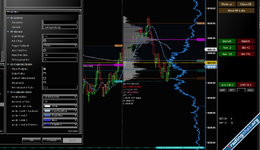
View attachment 434

⚑ One-Click Activation

β”Œβ”€β”€β”€β”€β”€β”€β”€β”€β”€β”€β”€β”€β”€β”€β”€β”€β”€β”€β”€β”€β”€β”€β”€β”€β”€β”€β”€β”€β”€β”€β”€β”
β”‚ SHOW FOOTPRINT β”‚ HIDE FOOTPRINT β”‚
β”‚ [Shift+Space] β”‚ [Shift+Space] β”‚
β””β”€β”€β”€β”€β”€β”€β”€β”€β”€β”€β”€β”€β”€β”€β”€β”€β”€β”€β”€β”€β”€β”€β”€β”€β”€β”€β”€β”€β”€β”€β”€β”˜

Toggle footprint view instantly with customizable hotkeys. Switch between regular charts and footprint view without losing your settings.​


🎯 Min Volume Filter – Cleaner, Smarter Footprint​


Not every printed trade matters.

The Min Volume Filter removes low-volume noise by applying a minimum threshold to each price level.

πŸ”Ž How It Works​

If volume at a price level is below your defined threshold:

➑ It is automatically displayed as Level 1 colour (lowest intensity)
➑ It does not get highlighted as significant activity
➑ It reduces visual clutter inside the bar

Only meaningful participation stands out.

πŸ“¦ Other Key Features​

πŸ”Ή Tick Aggregation Control – Group price levels for cleaner structure and reduced noise.​
πŸ”Ή Integrated Session Volume Profile – Real-time POC, VAH, VAL with automatic value area calculation.​
πŸ”Ή Auto Chart Scaling Adjustment – Optimized bar width and spacing when footprint is enabled.​
πŸ”Ή Per-Bar Summary Statistics – Total volume, bar delta, cumulative delta tracking.​
πŸ”Ή Delta Profile Mode – Visual delta intensity inside each bar.​
πŸ”Ή Stacked Imbalance Detection – Identifies consecutive aggressive dominance zones.​
πŸ”Ή Cumulative Swing Delta – Tracks delta shifts across structural swings.​
πŸ”Ή Per-Bar Volume & Delta Toggle – Display key stats directly on the chart.​
πŸ”Ή Bottom Panel (Delta / Volume) – Histogram-style visualization below price.​
πŸ”Ή Hotkey Toggle (Show/Hide) – Instantly switch between footprint and regular view.​
πŸ”Ή Custom Scroll & Zoom Control – Smooth zooming with footprint layout preservation.​


πŸ” Get Your LicenseπŸ†“

Activate XenFootprint here:
πŸ‘‰ https://tradingchat.org/account/license
Built with πŸ’™ for traders.

you should do some templates man, this foot looks fire, congrats man
 
I’ve been searching for this type of footprint for over two years β€” and eventually decided to build it myself.

I truly believe this is the most complete and refined footprint a trader can use. It’s inspired by the Market Delta platform and the type of tools used by top prop firm traders.

And it’s completely free to use.

In the future, I may develop an automated trading system built specifically around this footprint framework.

If you find any bugs or have suggestions for improvements, please share your feedback.
And if you find it valuable, share this forum to help support other traders.

Good luck and trade well.
it was fine but its saying the same thing again, "unable to contact license server - visit Tradingchat.org"
 
Recommendations:
1) Can you disable scroll as default
2) choosing colors for imbalances do not save in to a template when changed, it reverts back to default colors if nt8 is loaded or the chart template for xenfootprint is loaded.
3) A video or text explaining the strategy you have in mind or the one trade that you took, would be appreciated. the best way for an entry you have in mind. Auto strategy trader could be some other time. we will wait for that.
4) License server is messing up sometimes, loading up. Not sure if local license is better.

Love the speed of which it loads. Thanks again
 
Nah, check the imbalances because that's the only thing that's not working, that and the stackeds
 
Is there a License (Secret Key it asks for ) foot Print not loading / plotting ?
 

Attachments

  • Screenshot 2026-02-20 061837.png
    Screenshot 2026-02-20 061837.png
    176.6 KB · Views: 36
Downloaded, Got License Key ,Enabled Tick Reply, but No FootPrint on Chart , what am I missing .. Anybody have some Guidance for this issue ?
 

Attachments

  • Screenshot 2026-02-20 064553.png
    Screenshot 2026-02-20 064553.png
    209.8 KB · Views: 29
Back
Top Bottom