Mark

How to Start Futures Trading for free

This guide explains how to start futures trading for free using a demo account with real market data. No payment method is required, and everything can be set up in minutes.


Step 1: Download a Futures Trading Platform​

  1. Go to the official NinjaTrader website : https://ninjatrader.com/
  2. Create a free account (required for download)
  3. Download and install NinjaTrader Desktop (Version 8)
  4. Open NinjaTrader after installation
or use this and skip step 1 ninjatrader

Step 2: Create a Free Tradovate Demo Account​

  1. Visit the Tradovate registration page : https://trader.tradovate.com/register
  2. Enter an email address
  3. Open your inbox and confirm the registration link
  4. Complete the account setup by choosing:
    • Username (important — you will reuse this)
    • Password
After completion, your Tradovate demo account will be active.
-repeat after 14 days

Step 3: Connect Tradovate Demo to NinjaTrader​

  1. Open NinjaTrader
  2. On the login screen:
    • Enter your Tradovate username
    • Enter your Tradovate password
  3. Select Simulation / Demo
  4. Click Log in
You are now connected to live futures market data in simulation mode.


Step 4: Open a Chart and Start Trading​

  1. In NinjaTrader, open the Control Center
  2. Go to:
    • New → Chart
  3. Choose a futures contract (example):
    • E-mini S&P 500 (ES)
    • E-mini Nasdaq (NQ)
  4. Select a timeframe (e.g., 1-minute, 5-minute)
  5. Click OK
Your chart will load with real-time data.

What You Can Practice for Free​

With this setup, you can:
  • Practice entries and exits
  • Test trading strategies
  • Learn order types
  • Understand futures contracts
  • Use indicators and drawing tools
  • Trade during live market hours
There is no risk of losing real money.


Last edited:
1770038636269.png

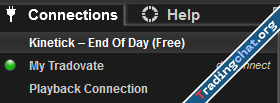
I chose the correct connection method because I don't fully understand it?
 
This guide explains how to start futures trading for free using a demo account with real market data. No payment method is required, and everything can be set up in minutes.


Step 1: Download a Futures Trading Platform​

  1. Go to the official NinjaTrader website : https://ninjatrader.com/
  2. Create a free account (required for download)
  3. Download and install NinjaTrader Desktop (Version 8)
  4. Open NinjaTrader after installation
or use this and skip step 1 ninjatrader

Step 2: Create a Free Tradovate Demo Account​

  1. Visit the Tradovate registration page : https://trader.tradovate.com/register
  2. Enter an email address
  3. Open your inbox and confirm the registration link
  4. Complete the account setup by choosing:
    • Username (important — you will reuse this)
    • Password
After completion, your Tradovate demo account will be active.
-repeat after 14 days

Step 3: Connect Tradovate Demo to NinjaTrader​

  1. Open NinjaTrader
  2. On the login screen:
    • Enter your Tradovate username
    • Enter your Tradovate password
  3. Select Simulation / Demo
  4. Click Log in
You are now connected to live futures market data in simulation mode.


Step 4: Open a Chart and Start Trading​

  1. In NinjaTrader, open the Control Center
  2. Go to:
    • New → Chart
  3. Choose a futures contract (example):
    • E-mini S&P 500 (ES)
    • E-mini Nasdaq (NQ)
  4. Select a timeframe (e.g., 1-minute, 5-minute)
  5. Click OK
Your chart will load with real-time data.

What You Can Practice for Free​

With this setup, you can:
  • Practice entries and exits
  • Test trading strategies
  • Learn order types
  • Understand futures contracts
  • Use indicators and drawing tools
  • Trade during live market hours
There is no risk of losing real money.


Here you can get real time Level 2 & Level 3 data (MBO) for Rithmic

Rithmic Data Providers


  1. https://optimusfutures.com/Platforms/RTrader.php


  1. https://www.dormantrading.com/trading-platforms/r-trader-pro/


  1. https://www.rithmic.com/demo.html#free-trial&customer=EmporosCapital


  1. https://stage5trading.com/platform-solutions/platforms/rithmic-rtrader-pro/


  1. https://www.rithmic.com/demo.html?s...bf-dcca05332816#free-trial&customer=AMPGlobal


  1. https://tradefutures4less.com/rithmic-demo-portal/


  1. https://edgeclear.com/rithmic/


  1. https://www.rithmic.com/demo.html#sign-up


9. https://signup.rithmic.com/demo.html#sign-up&customer=EmporosCapital


10. https://signup.rithmic.com/demo.htm...bf-dcca05332816#free-trial&customer=AMPGlobal
 
yes did that as well. I am using non edu ninja latest version. Any guide to connect will be really appreciated
if you ever used rithmic demo 1-2 times before , it will not work because it detected your machine id, to be able to work you need to buy any prop challenge.
 
really thanks you ! now i have rithmic trial data. i've been bored to test only in simulation data. that was bullshit.
 
Can anyone help me with how to download more history on the chart in NT8 via tradovate, because I can only see 5-7 days for various assets?
 
Can anyone help me with how to download more history on the chart in NT8 via tradovate, because I can only see 5-7 days for various assets?
Increase number of days in data series
 
if you ever used rithmic demo 1-2 times before , it will not work because it detected your machine id, to be able to work you need to buy any prop challenge.
you need change MAC address (Technitium software is well) and change your HD volume ID

then goto https://www.uuidgenerator.net/ and provide new key

replace the new keys in to:

HWprofileguide into > Computer\HKEY_LOCAL_MACHINE\SYSTEM\CurrentControlSet\Control\IDConfigDB\Hardware Profiles\0001

Machineguid into > Computer\HKEY_LOCAL_MACHINE\SOFTWARE\Microsoft\Cryptography

good website/forum , great job
 
Similar content Most view View more
Back
Top Bottom