What Is the Order Book (DOM)?
The Order Book, also called DOM (Depth of Market), shows all pending buy and sell limit orders at each price level.
In simple words:
- It shows where buyers are waiting
- It shows where sellers are waiting
What You See in the DOM
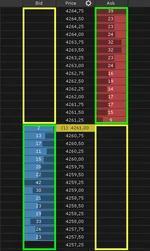
The DOM usually has three main parts:- Bid side – buy limit orders (buyers waiting)
- Price column – price levels
- Ask side – sell limit orders (sellers waiting)
Sell orders are above the current price.
What the Numbers Mean
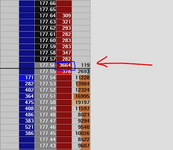
The numbers in the DOM represent:- How many contracts / shares are waiting at each price
- These orders are not executed yet
- They only execute when hit by a market order
- 500 on the bid at 100 → buyers want to buy 500 at 100
- 400 on the ask at 101 → sellers want to sell 400 at 101
How Trades Happen in the DOM
- Market buy orders hit the ask
- Market sell orders hit the bid
- When orders are filled, the size at that price decreases
- Price moves to the next level
Why the Order Book Matters
The DOM helps you see:- Areas of liquidity
- Where price may slow down
- Where price may move fast
- Slow price (absorption)
- Or disappear and let price move quickly
Beginner Tip
- DOM shows intent (what traders want to do)
- Market orders show action (what traders actually do)