Guides & Tutorials

- Sticky
This guide explains how to start futures trading for free using a demo account with real market data. No payment method is required, and everything can be set up in minutes. Step 1: Download a...
Extract and Copy the DLL files into: Documents\NinjaTrader 8\bin\Custom PredatorXOrderEntry

Copy the template .xml file to: Documents\NinjaTrader 8\templates\Chart Restart NinjaTrader. Open a chart → right-click the chart → Templates → Load. Select your custom template. That’s it.
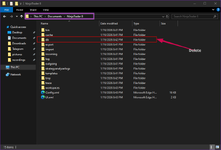
METHOD 1 — DELETE (RESET) DATABASE Purpose: Fix chart delay, wrong timestamps, missing ticks, slow chart loading What This Clears Historical price data (tick/min/day) Corrupt or mismatched...
Import Indicators Go to Tools → Import → NinjaScript Add-On. Select the .zip file. Complete the import and restart NinjaTrader. Remove Indicators Go to Tools → Remove NinjaScript Assembly. Select...
Close NinjaTrader Open File Explorer Navigate to: Documents\NinjaTrader 8\bin\Custom\ Paste the .dll file into this folder Restart NinjaTrader After restart, NinjaTrader will load the DLL...